How to play Tic-Tac-Toe?
Tic-Tac-Toe is a two-player game. One player uses the symbol “X” and usually goes first, while the other player uses the symbol “O.” Players sequentially put their symbols (also called marks) on a board with a three-by-three grid. The player who first gets three marks in a straight line wins. The winning marks can be placed vertically, horizontally, or along the two diagonals. If, after nine turns, the board is filled and no one has three marks in a row, then no one wins and the game ends in a tie.
Tic-Tac-Toe Strategy
Here are five tips that should help you win more and lose fewer games:
- The first player has an advantage. Remember that the board has nine fields. This means that the first player can make as many as five moves, while the second player can make only up to four moves.
- There are four ways to win using the middle field, three ways to win using a corner, and only two ways to win with a side field. Therefore, the middle field has the highest strategic value, followed by the corners. Prioritize making moves in these strategically important fields.
- Observe what your opponent does. Whenever they are only one mark short of completing a row, block them by placing your mark in the last empty spot.
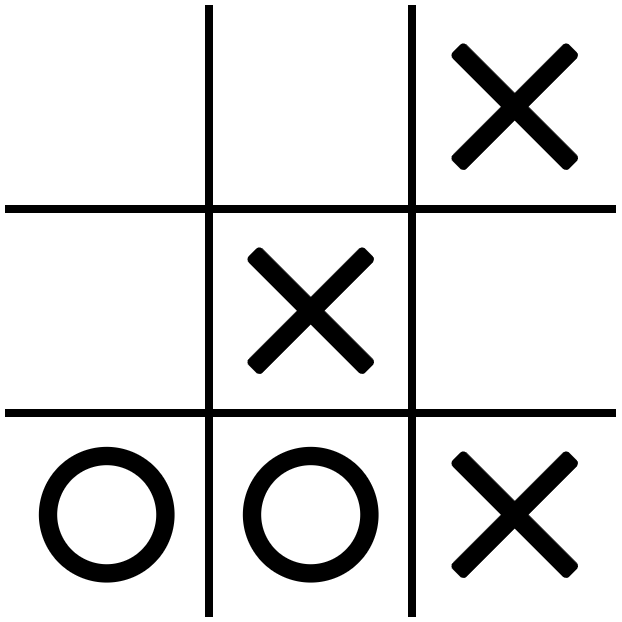
- Try to get two winning moves in the next turn. Then, even if your opponent blocks one of them, you can still win by making the other one (see the picture).
- This game can be won only if one of the players makes a mistake. If both players play perfectly, the game always results in a tie.
Tic-Tac-Toe Rules
Here is a summary of the game rules:
- The game starts with a blank three-by-three grid.
- The players take turns placing their symbols in the grid’s cells.
- Usually, X and O are chosen as the players’ symbols, but any two distinct marks will work.
- Usually, the player with X starts the game.
- To win, a player needs to have three symbols in a line. There are eight such lines possible: three horizontal, three vertical, and two diagonal.
- Once the round is over, players can play another round. The first player should switch each round to even the playing field.
The Tic-Tac-Toe Computer Game
Thank you for choosing our game. You can play it against a computer or with a friend. To quickly switch between the single-player and the multiplayer mode, click the button with a human silhouette (or two silhouettes) in the control panel below the game board.
The game shows the information about the current match. A match usually consists of 12 rounds, and the information panel below the game board indicates how many rounds each player has won. It also shows the current match’s running time. You can restart the game by clicking the first button on the left.
The functions of the remaining four buttons in the control panel are as follows: 1) switch the sound on or off (this button is disabled if sound is unavailable), 2) show the best scores and statistics, 3) show the feedback form, and 4) show the settings.
Game settings
The main game settings (in the “Gameplay” section) allow you to decide:
- Whether X and O are human or computer players, and, if the computer is selected, which AI should be used.
- Whether X or O starts the match.
- Whether the first player changes every round.
- Whether the summary dialog is displayed after each round. (It is by default disabled if you play against an AI and enabled if you play against a human.)
- How many rounds are there in a game? (There are 12 by default.)
- What is the time delay before the computer can make a move?
You can also change the way the game looks (in the “Appearance” section). Decide:
- What colors are used in the game?
- What animations are used for hints, moves, and highlighting the winning fields?
- Whether button animations are shown.
Warning! Setting the move animation to “None” means that the moves will not be displayed at all. This is useful if you want to simulate multiple rounds between two AIs quickly and don’t want to see the flickering as they make their moves. If you want moves to be displayed instantly, choose the “Simple” option instead.
Finally, you can select the sounds played by the game (in the “Sounds” section). You can choose what sounds are produced when players make their moves, and when the match is won or lost.
User AI
You can add your own AI to the game. Go to the “User AI” section in the game settings. There, you can specify the AI’s name and code. After saving it, your AI becomes available in the game through the drop-down menus in the “Gameplay” section of the game settings.
AIs are identified by their names. If you save an AI with a name that is already in use, the new AI will overwrite the old AI. You can also update or remove an AI that you have previously saved by selecting its name from the drop-down menu.
The AI’s code must be written in JavaScript as an arrow function. Your code must not have any mistakes. If it generates errors, you may be unable to use any of the AIs, including those that came with the game. To make them work again, you need to fix the errors or remove the offending AI. Here are two examples that you can use for testing. Just copy and paste their code.
Example 1:
/* This AI places a mark in the first available field. It also prints to the console whose turn it is and what the current score is. */
state => {
	console.log(state);
	let n = 0, p;
	for (let i=0;i<9;i++) if (state.board[i]>0) n++;
	p = (n%2)+1;
	console.log("Current player: "+p+". My wins: "+state.history[p]+", other player: "+state.history[3-p]+".");
	for (let i=0;i<9;i++) if (state.board[i]==0) {
		console.log("Move: "+i+".");
		return i;
	}
}
Example 2:
/* This AI attempts to place its mark in the middle of the board. If it can't, it makes a random move. */
state => {
	let move;
	if (state.board[4]==0) return 4;
	do {
		move = Math.floor(Math.random()*9);
	} while (state.board[move] != 0);
	return move;
}
A user AI must be a function of a single variable. This variable (state in the examples above) contains the game’s current state. It is an object with two properties. Property board is an array of nine elements with a status of each field (0 – empty; 1 – 1st player’s mark; 2 – 2nd player’s mark). Property history is a three-element array with the numbers of ties and wins in the current match. The function must return the number of the field where the mark is to be placed. If you want to understand these variables fully, try to make Example 1 play against itself a few rounds and observe the values printed to the console.
Embedding the game
You are welcome to embed this game on your website using an iframe element free of charge. It can be done for both commercial and non-commercial purposes. You may want to let us know (through an email address listed below) that you embedded our game. Then we will be able to notify you if we make any changes to our game that may affect how it appears on your page.
If you decide to embed our game, please credit the original website. This is not mandatory; however, we would greatly appreciate it. For example, you may post the following link next to the iframe or somewhere else on the page:
<a href="https://tictactoegame.eu/">The Tic-Tac-Toe game made by Simiade</a>
or
<a href="https://tictactoegame.eu/">Source: Tic-Tac-Toe – the online game</a>
Here is an example code embedding the game:
<iframe src="https://tictactoegame.eu/?bare&settings=%5B%5B0%2C1%5D%2C%5B1%2C7%5D%2C0%2C1%2C0%2C12%2C500%2C1%2C%5B1%2C1%5D%2C2%2C1%2C3%2C5%2C3%2C1%2C0.3%2C%22%23d1cb95%22%2C%22%23d1cb95%22%2C%22%23d1cb95%22%2C%22%23181818%22%2C%22%2340985e%22%2C%22%231a644e%22%2C%22%23d1cb95%22%5D" title="Tic-Tac-Toe" width="320" height="480" frameBorder="0"></iframe>
There are two parameters in the URL. They are both optional. The parameter bare indicates that the game should be displayed without the article below the fold. The parameter settings indicates the default settings for the game. It can be used, for example, to match the colors in the game to your website’s design. To obtain such a configuration string, go to https://tictactoegame.eu/, change the settings appropriately, and paste the following command into the console:
encodeURIComponent(localStorage.ttt_settings)
The game does not have a mechanism for dealing with malformed setting strings, so make sure everything works as intended before you make it public.
Let us know if you encounter any difficulties during the embedding process – we will be glad to help.
Contact us
If you have an opinion about this game that you would like to share with us, please use the feedback form available in the game. You can reach it by clicking the button with two hands located in the game control panel.
This game was created by the Simiade company. Any questions, comments, thanks, or complaints can be sent directly to us:
Adam Narkiewicz
Plac Bankowy 2
00-095 Warszawa
Poland
+48 728235409
contact@tictactoegame.eu
https://simiade.com/